
Appearance
Currencies
Every coin, token and fiat currency on the exchange lives here, with the networks it moves on, the limits and fees for deposits and withdrawals, and where else it can be used: P2P, merchant payments and card buy/sell.
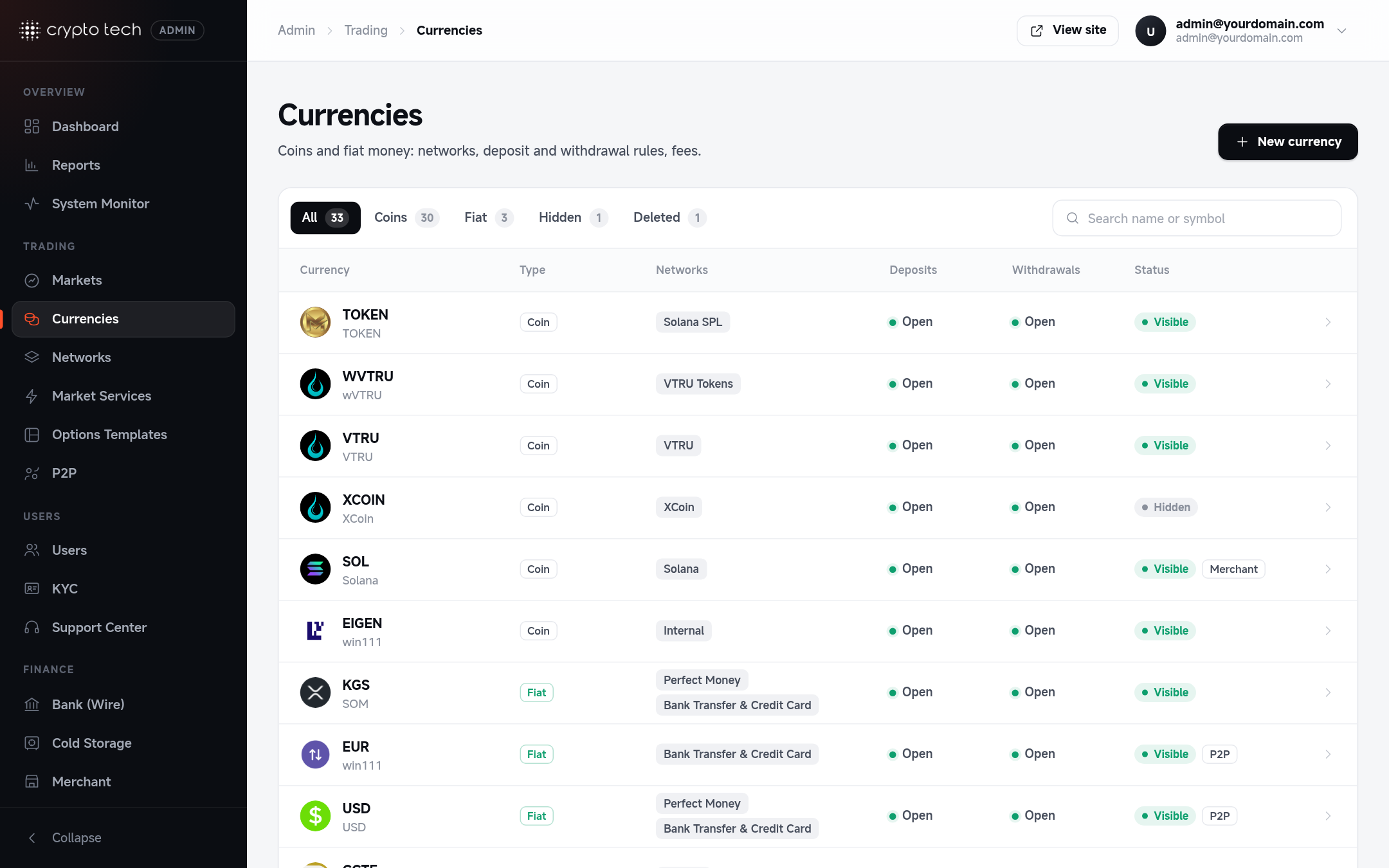
The currencies list
Admin → Trading → Currencies shows each currency with its type, networks, and whether deposits and withdrawals are open. Search by name or symbol, and filter by status (visible / hidden).
Adding a currency
Click the create button and work through the sections. Sections that need attention are marked, and the save bar appears as soon as something changes.
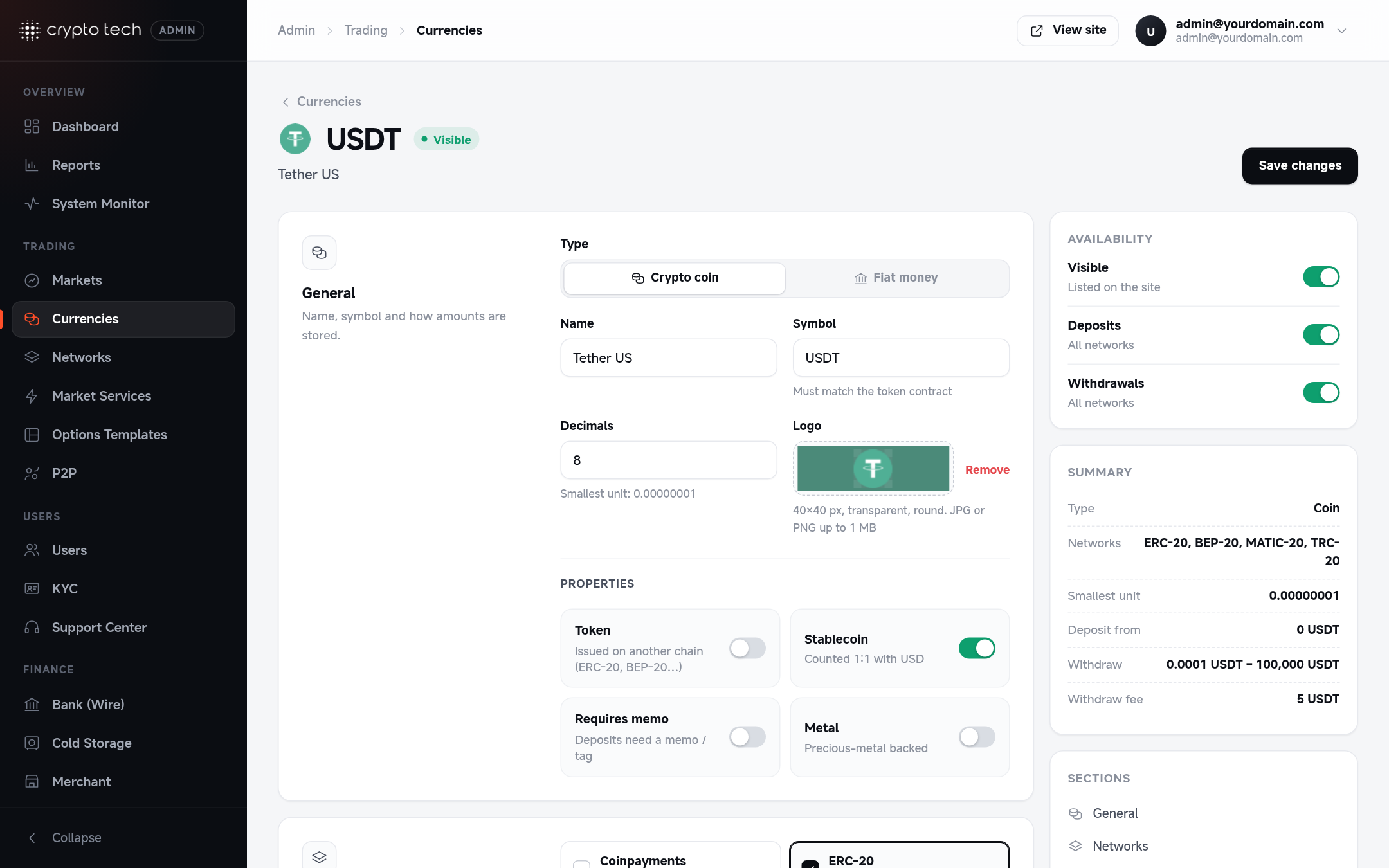
General
| Field | Meaning |
|---|---|
| Type | Coin (crypto) or Fiat (bank money such as USD or EUR) |
| Name | Full name, for example Bitcoin |
| Symbol | Ticker in upper case, for example BTC. For tokens it must match the token contract's symbol. |
| Decimals | How many decimals amounts are stored with. The form shows the smallest unit. |
| Logo | 40×40 px, transparent background, round. JPG or PNG up to 1 MB. |
| Token | Issued on another chain (ERC-20, BEP-20 and so on) |
| Stablecoin | Counted 1:1 with USD in totals and limits |
| Requires memo | Deposits need a memo or tag (for example XRP or TON) |
| Metal | Backed by a precious metal |
Networks
Where the currency can be deposited and withdrawn. Tick each network and fill in its details:
| Network | You provide |
|---|---|
| ERC-20 (Ethereum) | Token contract address (0x…) |
| BEP-20 (BNB Smart Chain) | Token contract address (0x…) |
| TRC-20 (Tron) | Token contract address (T…) |
| POL-20 (Polygon) | Token contract address (0x…) |
| Solana SPL | Token mint address |
| Custom token | Contract on your custom chain |
| Bank transfers (fiat) | The bank account users wire money to |
| Card payments (fiat) | Charged in USD through Stripe. Set the USD exchange rate: 1 for USD, or for example 1.17 for EUR (1 EUR = 1.17 USD) |
Double-check contract addresses
A wrong contract address means deposits of the real token won't be detected. Copy the address from the token's official site or a block explorer, never from a chat message.
Limits
| Field | Meaning |
|---|---|
| Minimum (deposit) | Smaller deposits are not credited. Tell users about this on your fees page. |
| Maximum (deposit) | Largest deposit accepted |
| Minimum / Maximum (withdrawal) | Smallest and largest withdrawal |
| Confirmations | How many blocks must pass before a deposit is credited |
Fees
A table with one row for the currency's default fees and one row per token network you selected. Each row has four cells:
| Cell | Meaning |
|---|---|
| deposit % | Percentage taken from each deposit |
| deposit fixed | Fixed amount taken from each deposit |
| withdraw % | Percentage taken from each withdrawal |
| withdraw fixed | Fixed amount taken from each withdrawal |
A percentage fee wins. When it's 0, the fixed fee is used. When the currency has ERC-20, BEP-20, TRC-20 or POL-20 networks, deposit fees are set per network (the default row shows "Set per network below").
Pricing withdrawals
Set fixed withdrawal fees a little above the network's typical transaction cost, so withdrawals never cost you money when gas prices rise.
Network availability
Pause deposits or withdrawals on one network without touching the others, for example while a token's network is congested. To pause a whole blockchain for every currency, use Networks instead.
P2P
| Field | Meaning |
|---|---|
| Available in P2P | For coins: users can post and take P2P ads for it. For fiat: it can be used as the P2P payment currency. |
| Min order / Max order | Size limits for one P2P order |
| Maker · buy / Maker · sell / Taker · buy / Taker · sell | P2P fees for each side |
Merchant payments
(Coins only.) Let merchants accept this coin on their invoices.
| Field | Meaning |
|---|---|
| Merchant acquiring | Shows the coin as a payment option on merchant invoices |
| Processing fee | Charged on every paid invoice |
| Confirmations | Before a payment counts as paid |
| Min invoice / Max invoice | Invoice size limits, in USD |
| Payment networks | Which of this currency's networks merchants can be paid on |
Buy & sell crypto
Card on-ramp and off-ramp through Unlimit:
- Can be bought with: the coin appears in Buy Crypto.
- Can be sold for fiat: the coin appears in Sell Crypto.
- For fiat currencies: Pay with it in Buy Crypto and Pay out in it in Sell Crypto.
Links
Website, X (Twitter) and Discord links, shown on the coin's info pages.
Availability
| Switch | When off |
|---|---|
| Visible | The currency is hidden on the site |
| Deposits (all networks) | No deposits on any network |
| Withdrawals (all networks) | No withdrawals on any network |
Deleting and restoring
Delete currency hides it and stops deposits. Open it again and click Restore currency to bring it back.
Typical setups
USDT on several networks
Type Coin, symbol USDT, Token and Stablecoin on. Under Networks tick ERC-20, BEP-20 and TRC-20 (and others you support), and paste the official USDT contract for each. Set deposit and withdrawal fees per network in the fee table: TRC-20 withdrawals are usually cheapest.
A fiat currency (EUR)
Type Fiat, symbol EUR, decimals 2. Tick Bank transfers and choose your EUR bank account. Optionally tick Card payments with a USD exchange rate. Set withdrawal fees and limits. Turn on Available in P2P if users should pay for P2P trades in EUR.