
Appearance
Captcha (Cloudflare Turnstile)
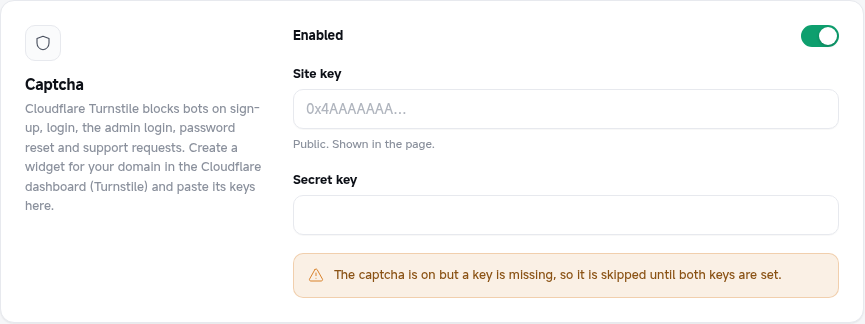
Stops bots from creating accounts, guessing passwords, requesting password-reset codes and spamming your support inbox. The platform uses Cloudflare Turnstile: most people just see a small "Success!" box, with no puzzles to solve.
Where it's checked
When it is on, the Turnstile check is required on the website for:
- Sign-up (the first step, before the email or SMS code is sent)
- Login
- Admin login (
/exchange-control-panel/admin-login) - Forgot password (before a reset code is sent)
- Support form (new tickets)
The mobile app can't show the widget, so app requests don't need it; they are protected by the one-time email / SMS codes and per-IP rate limits instead.
Setting it up
- In the Cloudflare dashboard, open Turnstile and add a widget (Cloudflare account needed; your domain does not have to use Cloudflare DNS).
- Add your website's hostname (for example
yourdomain.com; addwww.yourdomain.comtoo if you use it). Widget mode Managed is a good default. - Copy the Site key and the Secret key.
- In Admin → Settings → Captcha, paste both keys, turn on Enabled, and save.
Both keys are written to .env (TURNSTILE_SITE_KEY, TURNSTILE_SECRET_KEY); the on/off switch is stored in the database. See Settings stored in the .env file.
No lock-out with a missing key
The check only runs when the switch is on and both keys are set. If a key is missing, the page shows a warning and forms work without the captcha, so you can't lock yourself out.
How it works
The page loads the Turnstile widget from challenges.cloudflare.com. When the visitor passes, the widget gives the form a one-time token (cf-turnstile-response); the server checks it with Cloudflare (siteverify, with the visitor's IP) before doing anything else. A token works once and expires after a few minutes; the widget refreshes itself, and after a failed submit the form asks for a new check.
If the check fails the form shows The security check failed. Please try again. Your server must be able to reach https://challenges.cloudflare.com for this.
Testing
Cloudflare publishes test keys: site key 1x00000000000000000000AA with secret 1x0000000000000000000000000000000AA always passes (the widget shows "For testing only"). Use them on a staging site only.