
Appearance
Markets
A market is a trading pair, such as BTC-USDT. This section controls every pair: which coins it trades, the order limits, where its chart comes from, whether a bot keeps its order book filled, and what users can do on it.
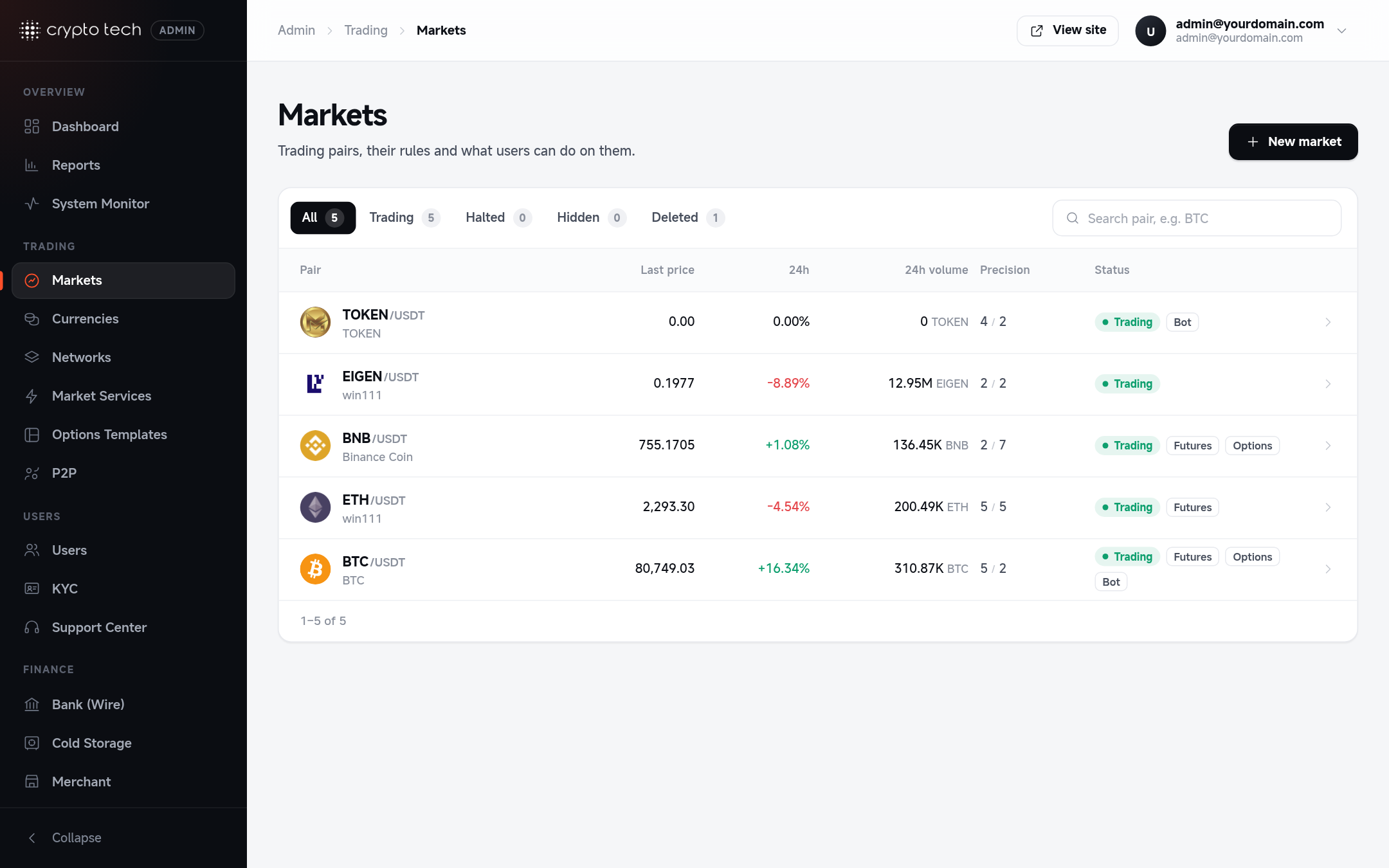
The markets list
Admin → Trading → Markets lists every pair with its live last price, 24h change, 24h volume, precision (amount / price decimals), status and whether the market-making bot is running on it.
- Search by pair, for example
BTC. - Status tabs:
| Tab | Shows markets that are |
|---|---|
| All | Everything except deleted markets |
| Active | Visible on the site, with trading on |
| Halted | Visible, but trading is off (no new orders) |
| Hidden | Not listed on the site |
Click a market to edit it, or use the create button to add one.
Creating a market
Before you start, make sure both coins exist in Currencies. Then fill in the sections below and save. The editor has a section menu on the left: sections with a problem are marked Has errors, and the save bar appears when you have Unsaved changes.
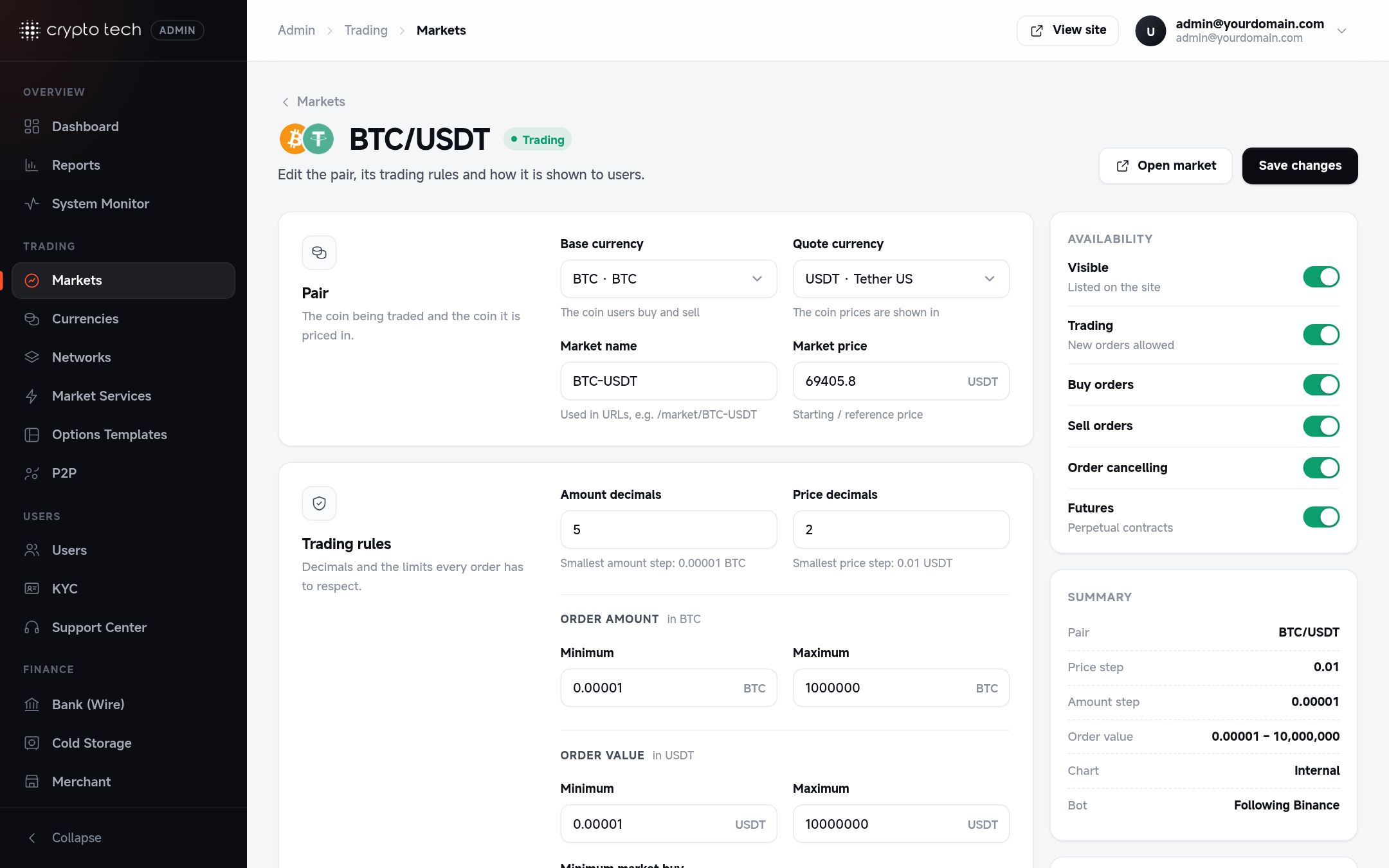
Pair
| Field | Meaning |
|---|---|
| Base currency | The coin users buy and sell (BTC in BTC-USDT) |
| Quote currency | The coin prices are shown in (USDT in BTC-USDT) |
| Market name | Used in web addresses, for example /market/BTC-USDT. Click Use to take the suggested name. Keep the BASE-QUOTE format. |
| Market price | The starting / reference price, in the quote currency |
Trading rules
The limits every order must respect.
| Field | Meaning |
|---|---|
| Amount decimals | How many decimals an order amount can have. The form shows the resulting smallest amount step, for example 0.0001 BTC. |
| Price decimals | How many decimals a price can have, with the smallest price step |
| Minimum / Maximum (amount) | Smallest and largest order size, in the base coin |
| Minimum / Maximum (value) | Smallest and largest order value, in the quote coin |
| Minimum market buy | The smallest amount a market buy order can spend |
Choosing decimals
Match the precision used on major exchanges for the pair. Too many decimals clutter the order book; too few make small orders impossible. BTC-USDT usually uses 5–6 amount decimals and 2 price decimals.
Spread
A markup applied to the liquidity provider's prices, in percent (0–100):
- Ask spread: added to the provider's ask (selling) price.
- Bid spread: applied to the provider's bid (buying) price.
Only used when the market takes its liquidity from an external provider (see Market services).
Chart
Where the candles on the trade page come from.
| Chart type | Candles come from |
|---|---|
| Internal | Trades on your own exchange |
| From liquidity provider | The connected liquidity provider |
| External custom market | Another market you name in Custom market name |
Default resolution is the candle interval the chart opens with.
External chart data
Turn this on to load candles from Binance, MEXC or Bybit instead of your own trades. This gives new markets a full price history from day one. Choose the data source and, if the pair has a different name there, the external symbol (leave it empty to use the pair name). Candles are cached automatically.
Categories
Tags that place the pair in the filters on the public Markets page: Meme, Layer 1, Layer 2, Innovation, AI, DeFi, GameFi, PoW, Fan tokens, NFT. Tick all that apply.
Options trading
| Field | Meaning |
|---|---|
| Options enabled | Lets users trade up/down binary options on this pair |
| Minimum position / Maximum position | Smallest and largest option stake |
The payout is set globally in Trading & fees.
Liquidity bot
Your own market maker. It keeps the order book filled and trades on this pair, so the market looks alive and users always have someone to trade with.
| Field | Meaning |
|---|---|
| Custom liquidity | Turns the bot on for this pair |
| Follow Binance price | The bot sticks to the live Binance price, with 0–1% variation. Floor and ceiling are ignored. Set the Binance symbol if it differs. |
| Floor / Ceiling | The lowest and highest price the bot will move to (when not following Binance) |
| Starting price | Where the bot starts. Leave empty to start from the last price. |
| Direction, Trend strength | The overall drift of the price |
| Base volatility | How much the price moves per cycle, as a fraction (0.02 = 2%) |
| Burst chance | Chance of a sudden move per cycle (0.05 = 5%) |
| Depth per side | How many orders the bot keeps on each side of the book |
| Bid-ask spread | Gap between the best bid and ask, as a fraction (0.001 = 0.1%) |
| Min / Max trade amount | Size range of the bot's own trades |
| Min / Max interval | Time between bot cycles, in milliseconds (the form shows seconds) |
Realistic markets
For listed coins, turn on Follow Binance price: your price then tracks the real market and arbitrage traders have no gap to exploit. Use floor/ceiling mode only for your own token or coins not on Binance.
Bot trades aren't linked to a user account, so they don't appear in user reports, but they do count towards market volume.
Availability
The switches that decide what users can do:
| Switch | When off |
|---|---|
| Visible | The pair is hidden everywhere on the site |
| Trading | No new orders (the market shows as Halted). Buy and sell switches are disabled while this is off. |
| Buy orders | Users can't place buy orders |
| Sell orders | Users can't place sell orders |
| Order cancelling | Users can't cancel their open orders |
| Futures | No perpetual futures trading on this pair |
Halting a market
To pause a market during an incident, turn off Trading and leave Order cancelling on, so users can still pull their orders. To stop all markets at once, use Pause all trading in Trading & fees.
Deleting and restoring
Delete market hides the pair everywhere and stops trading. It isn't erased: open the market again and click Restore market to bring it back.