
Appearance
General
Your brand, the platform-wide feature switches, daily withdrawal limits and the markets people land on.
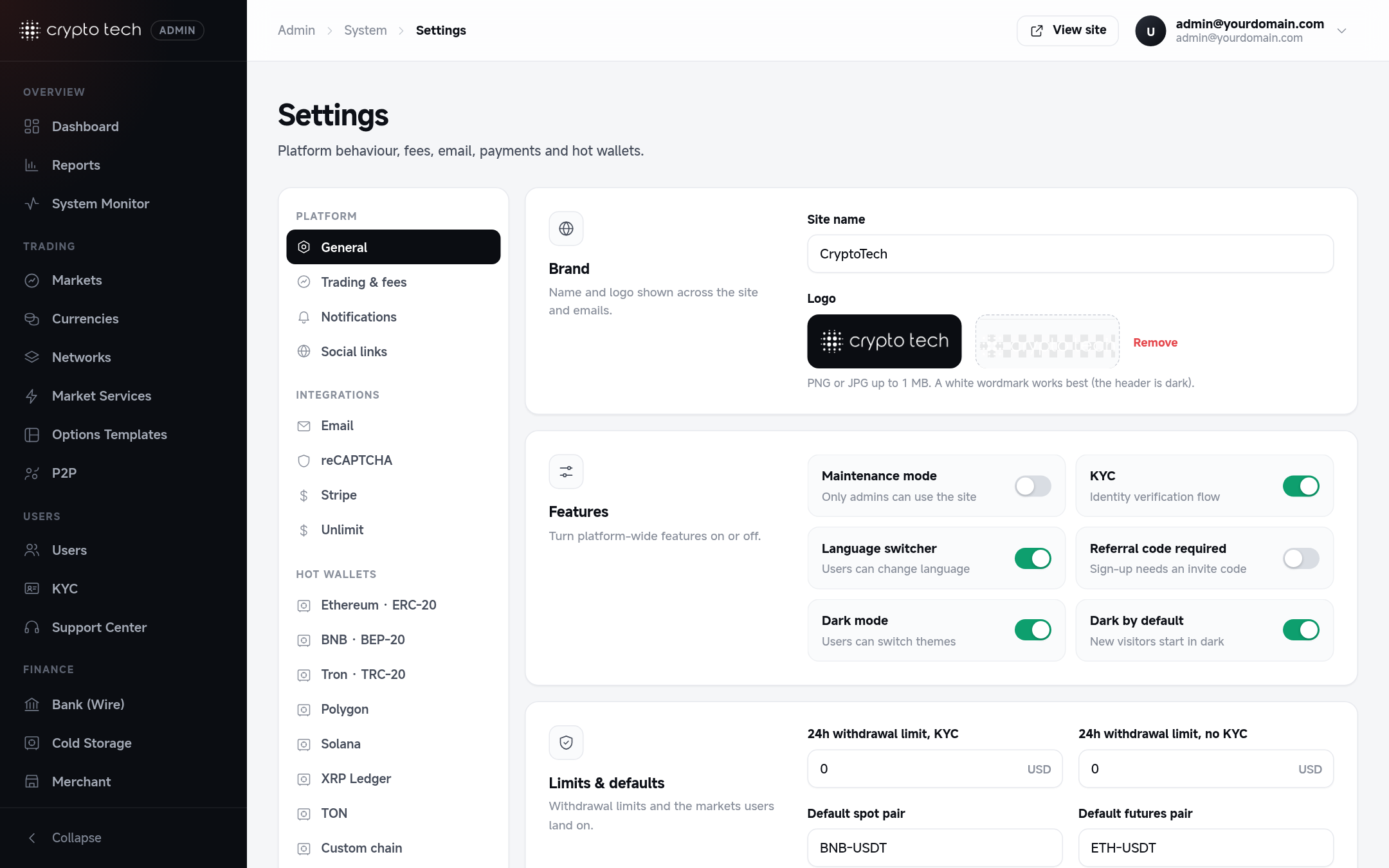
Brand
| Field | What it does |
|---|---|
| Site name | Shown in the browser tab, emails and anywhere the platform names itself. Stored as APP_NAME in .env (see Settings stored in .env). |
| Logo | PNG or JPG up to 1 MB. Shown in the site header, footer, admin panel and error pages. |
Logo that works in light and dark mode
Upload a white wordmark on a transparent background. On light backgrounds the site recolours the white, unsaturated parts of the logo to the text colour, so one file works in both themes. Coloured parts (an icon, for example) keep their colours.
To remove the logo, click Remove under the preview and save.
Features
Each switch takes effect for everyone as soon as you save.
Maintenance mode
Takes the site offline for everyone except administrators.
- Visitors and signed-in users are sent to the maintenance page.
- API requests get a "down for maintenance" message instead of data.
- New orders are refused for non-admins.
- Administrators keep full access, so you can test changes before reopening. The admin sign-in page keeps working.
WARNING
While maintenance mode is on, users can't sign in, trade or withdraw. The settings page shows a reminder until you turn it off.
KYC
Turns the identity verification flow on or off.
- On: users see the verification page (Account → Identity verification) and can upload documents. New documents appear in Admin → KYC.
- Off: the verification page shows that verification isn't available, and nothing can be uploaded.
Verification itself doesn't block other pages. What it changes is the daily withdrawal limit (see Limits & defaults below).
Language switcher
When on, the globe menu in the header lets visitors choose a language. Manage languages in Admin → Languages.
Referral code required
When on, nobody can register without a valid referral code from an existing user. This also applies to social sign-in, so new users can't sign up with Google or Apple while it's on (existing users can still sign in).
Dark mode and Dark by default
| Dark mode | Dark by default | Result |
|---|---|---|
| Off | – | Always light. The theme toggle is hidden. |
| On | Off | New visitors follow their device's light/dark setting. They can switch in the header. |
| On | On | New visitors start in dark. They can switch in the header. |
A visitor's own choice always wins once they have picked one. It is remembered in their browser.
Limits & defaults
Daily withdrawal limits
Each user's 24-hour withdrawal limit comes from their VIP level: set it per level in VIP levels. This section keeps one extra field:
| Field | Applies to |
|---|---|
| 24h cap for unverified users | Users who haven't passed identity verification never get more than this, whatever their level. 0 = no extra cap. |
How the limit is calculated:
- Amounts are in USD. Each coin is converted at its current USD price.
- It is a rolling 24 hours: everything a user withdrew in the last 24 hours counts, except rejected or failed withdrawals.
- Crypto and fiat withdrawals count together.
- A level limit of
0means no daily limit.
Common setup
Set a small cap for unverified users (for example 1000). Verified users then get their level's limit. This encourages verification while letting new users try the platform.
Security hold
| Field | Default | What it does |
|---|---|---|
| Security hold | 24 hours | After a user changes their password, email, phone number or 2FA (turning it off), or resets a forgotten password, crypto and fiat withdrawals and new P2P sales are paused for this many hours. 0 = off, maximum 168 (7 days). |
Trading, deposits and buying on P2P keep working. The user sees the end time on the withdraw page and in Withdrawal protection. This stops someone who took over an account (and changed the password or 2FA) from emptying it before the owner notices the security email. Admins can lift or extend a hold per user in Users → Edit.
Default markets
| Field | Used for |
|---|---|
| Default spot pair | Where "Trade" links and the 404 page's Trade card send people, for example BTC-USDT. |
| Default futures pair | The futures market opened from the menu. |
| Default swap market | The pair pre-selected on the Swap page. |
Use the market's name exactly as it appears in Admin → Markets: base, hyphen, quote, for example ETH-USDT.