
Appearance
Market services
The exchange depends on background services: one fills resting orders, one triggers stop orders, two provide liquidity, one runs the queues, one serves the websockets, and so on. This page shows whether each one is really working (not just running), lets you start, stop or restart it, and switches liquidity on or off per market.
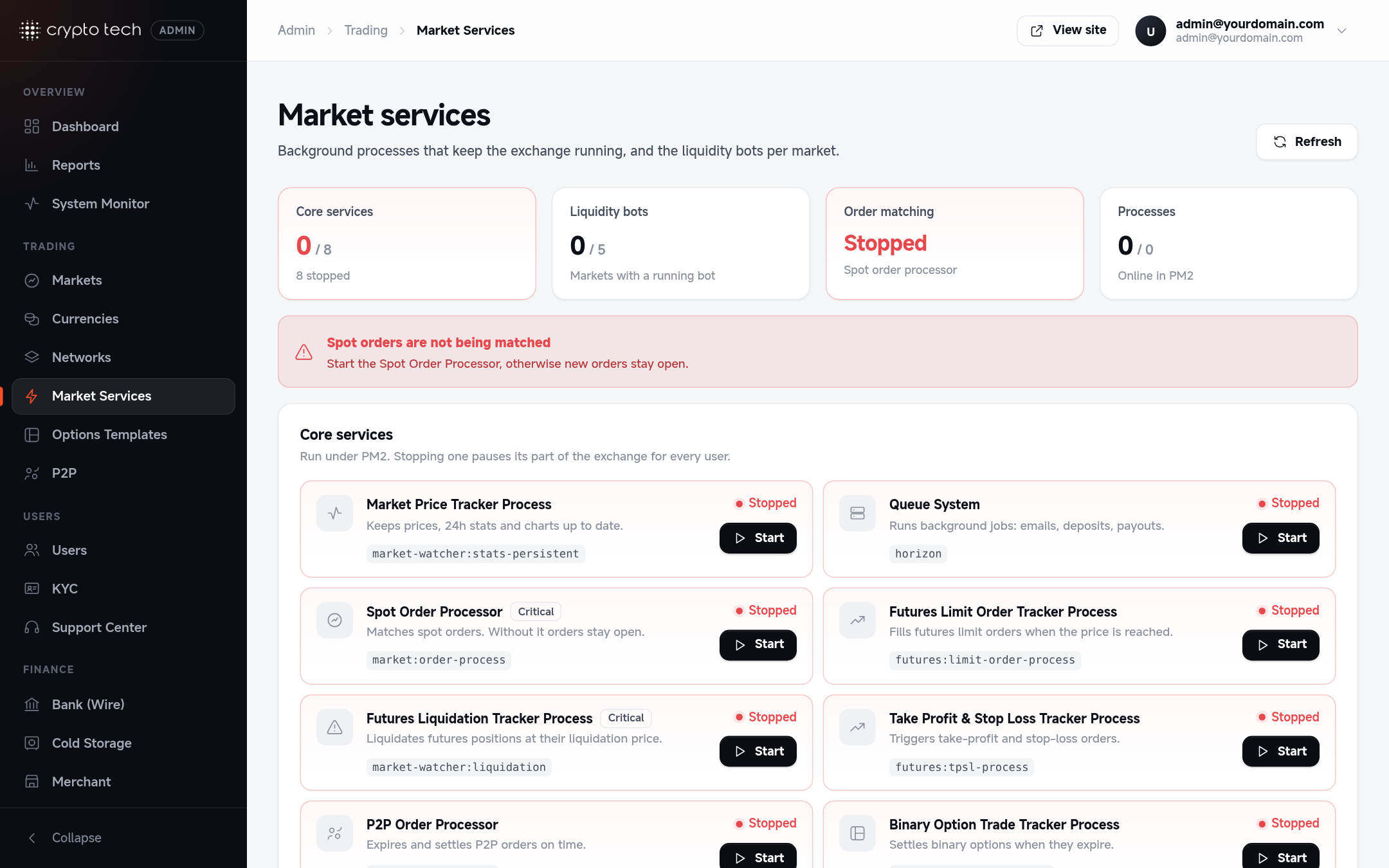
The page refreshes itself every 15 seconds.
Health: running is not enough
Every worker loop records a heartbeat after each pass ("alive at 12:03:05, handled 4 items"). A process can be online in PM2 and still be stuck (a hung network call, a database lock), so the page combines both:
| State | Meaning |
|---|---|
| Running | The process is up and its heartbeat (or health check) is recent |
| Starting | Just started; the first heartbeat isn't due yet |
| Not responding | The process is up but its loop stopped turning. It is restarted automatically (at most once every 5 minutes, PM_STALE_RESTART_COOLDOWN), superadmins get a notification, and you can press Restart at once |
| Stopped | Not running: crashed and not back yet, or never started. The watcher starts it within a minute |
| Off | You stopped it here. It stays off, also after a server restart, until you press Start |
| Running outside PM2 | (WebSocket and Chart servers) Not in this PM2, but its health check answers: it was started some other way. It's never started a second time |
Each card also shows the last heartbeat, uptime, memory, restart count and the last error the worker hit.
A red banner at the top names every critical service that is stopped or not responding (Queue, WebSocket, Spot Order Processor, provider liquidity, futures liquidations).
Core services
| Service | PM2 name | What it does | When it's not running |
|---|---|---|---|
| Queue System | horizon | Background jobs: order book and wallet updates, emails, webhooks | Jobs wait; live balance updates are late |
| WebSocket Server | soket | Soketi: live books, trades, prices and wallet updates | Pages and the app stop updating live |
| Chart Data Server | chart | TradingView chart history (chart-udf) | Charts don't load |
| Market Price Tracker | market-watcher | Prices and 24h statistics from the provider | Prices and statistics freeze |
| Spot Order Processor | order-processor | Fills resting orders the liquidity price moves through | Those orders wait (new orders still match at once) |
| Stop Order Trigger | stop-trigger | Places stop-limit and OCO stop orders when the price reaches the stop, moves trailing stops with the price and fires them, and fires TP/SL orders | Stops trigger only once a minute (scheduler safety net), and trailing stops only follow the price that often |
| Trading Bots | trading-bots | Grid and DCA bots react to their fills | Bots don't place their next orders |
| Liquidity (provider markets) | liquidity-binance | Mirrors the provider's book and trades for every provider-backed market | Those markets have no liquidity |
| Liquidity (custom tokens) | liquidity-custom | Simulated book and trades for every custom-token market | Those markets have no liquidity |
| Futures Mark Price | futures-mark-price | Index and mark prices | Liquidations fall back to the last price (Futures Risk) |
| Futures Liquidations | futures-processor | Liquidates isolated and cross positions | Positions aren't liquidated |
| Futures Limit Orders | futures-limit-processor | Opens futures limit orders at their price | Futures limit orders don't fill |
| Futures TP/SL | futures-tpsl-process | Closes positions at take-profit / stop-loss | TP/SL don't trigger |
| P2P Order Processor | peer-order-processor | Cancels P2P orders past their payment time | Expired P2P orders stay open |
| Options Processor | options-processor | Starts and settles binary options | Options don't settle |
The futures, P2P and options services are part of plan 5.
Start, Stop and Restart:
- Stop is remembered: the service stays off until you start it here (the watcher won't bring it back).
- Restart lets a worker finish its current pass, then starts it fresh (a few seconds). Use it after changing settings that a worker reads at start.
- Workers also restart by themselves once an hour and when they pass their memory limit, so code updates and leaks never build up.
Only these services can be started or stopped
The buttons accept only the services in config/pm.php (plan-5 services only on plan 5), and what runs is always defined on the server, never sent by the browser. Liquidity can only be switched on for markets whose name has the normal BASE-QUOTE form.
Market liquidity
One row per market: its status, bot settings and Liquidity state. Switch liquidity on or off with Start / Stop.
- Live: the runner updated this market's book recently ("Book 2s ago").
- Waiting: switched on, first book not in yet (a few seconds).
- No updates 3m: switched on but its book stopped moving. Check the liquidity runner above, and for provider markets that the provider still lists the pair.
- Off: no liquidity on this market. Switching it off removes its levels at once, so nothing can match against a book that no longer moves.
For a provider-backed market, Start first checks that the provider has the pair; if it doesn't (or can't be reached), liquidity isn't switched on and the page says why. The bot's behaviour for custom tokens (price range, volatility, depth, trade sizes) is set on the market's page, see Markets → Liquidity bot.
Two runners for all markets
By default (PM_LIQUIDITY_MODE=shared) two processes serve every market:
liquidity-binancekeeps one websocket connection to Binance carrying the book and trades of every provider-backed market. It re-reads which markets are on every 2 seconds and subscribes or unsubscribes live, and it reconnects by itself if the connection drops.liquidity-customruns the simulation of every custom-token market, each on its own random interval.
One market's error never stops the others. With many provider markets, split the Binance runner: PM_LIQUIDITY_SHARDS=2 runs liquidity-binance-1 and liquidity-binance-2, each with half the markets.
The older layout, one process per market (LIQ-BTCUSDT, ...), is still available with PM_LIQUIDITY_MODE=per-market. It uses much more memory and one Binance connection per market and stream.
Processes
Everything PM2 is running on the server, for troubleshooting: name, status, PID, uptime, restarts, CPU and memory. A fast-growing restart count means a crash loop (PM2 backs off up to 15 seconds between tries). Check its log with pm2w logs <name> (see Installation → Prepare PM2).
This list is hidden while the site is in read-only demo mode.
How it is kept running
- PM2 runs each service from one file,
storage/app/pm2/ecosystem.json, written byphp artisan pm:ecosystemfromconfig/pm.php. It sets each service's memory limit, a 15-second graceful stop and crash back-off. pm:watcher(scheduler, every minute) keeps PM2 in line with that list: starts what is missing, leaves alone what you switched off, recreates a process whose definition changed, and restarts workers that stopped responding. Switch it off withPM_SERVICE_WATCHER_ENABLED=false. See Installation → Background services.- System Monitor has a Background Workers check (stuck or stopped services) and checks that every market with liquidity had a book update in the last 2 minutes.