
Appearance
Users
Every account on your exchange: verification status, restrictions, security, staff roles, and shortcuts to the user's balances and history.
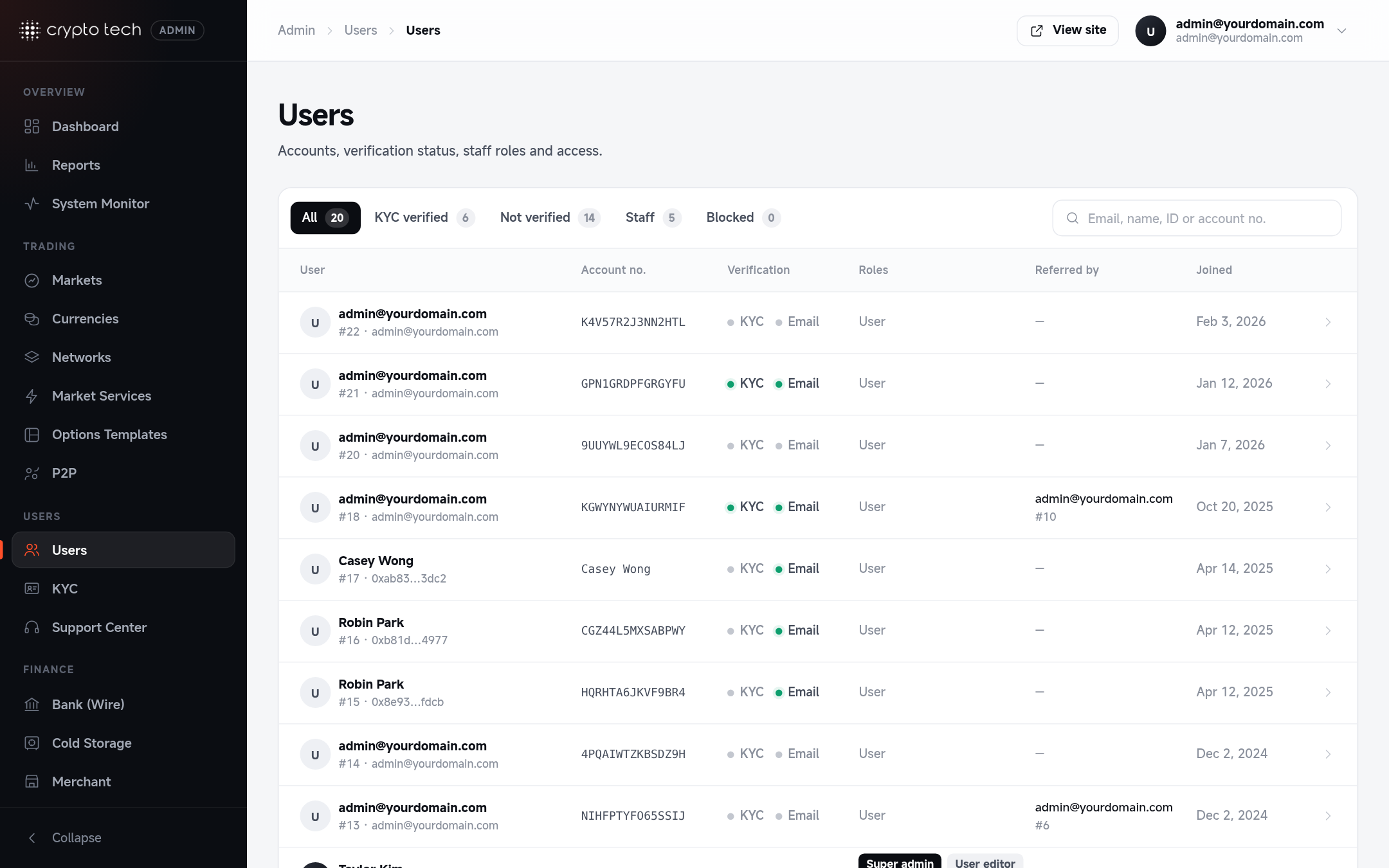
Finding a user
Admin → Users → Users. Search by email, name, ID or account number, and use the tabs:
| Tab | Shows |
|---|---|
| All | Every account |
| KYC verified | Users who passed identity verification |
| Not verified | Users who haven't |
| Staff | Accounts with admin roles |
| Blocked | Blocked accounts |
Each row shows the account, its verification badges, roles, who referred the user, and when they joined.
Editing a user
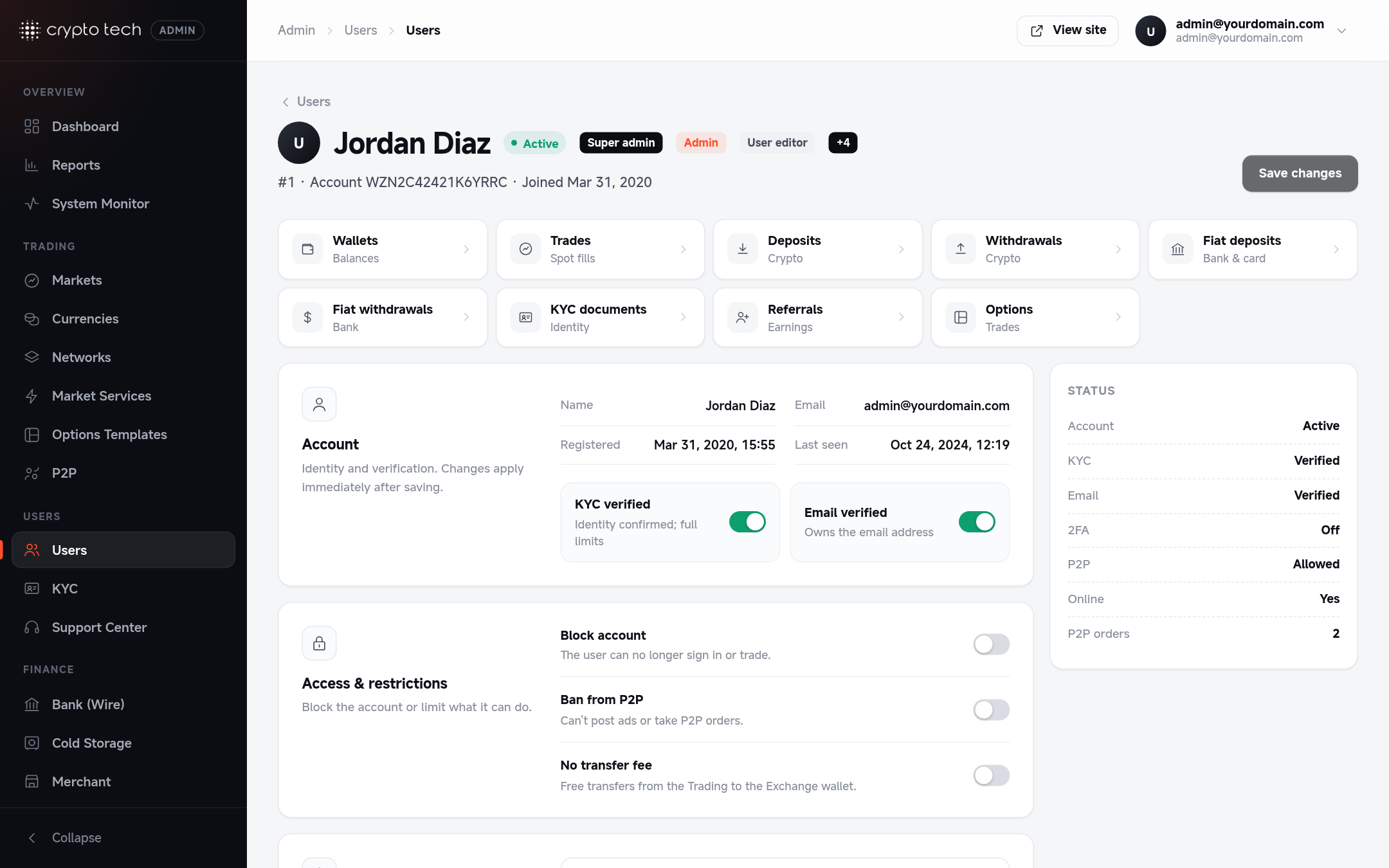
Click a user to open their page. Changes apply as soon as you save.
User activity
Shortcuts to everything about this user, each opening the matching report filtered to them: Wallets, Trades, Deposits, Withdrawals, Fiat deposits, Fiat withdrawals, KYC documents, Referrals and Options.
Account
| Switch | Meaning |
|---|---|
| KYC verified | Identity confirmed. Lifts the cap for unverified users, so the user gets their VIP level's full withdrawal limit. Normally set by approving their documents in KYC. |
| Email verified | The user owns the email address |
Access & restrictions
| Switch | Effect |
|---|---|
| Block account | The user can no longer sign in or trade |
| Ban from P2P | The user can't post ads or take P2P orders |
| No transfer fee | Free transfers from the Trading to the Exchange wallet, whatever the transfer fee is |
Security
If a user has lost the device with their authenticator app, turn off Two-factor authentication here so they can sign in and set it up again. This also starts the security hold: withdrawals stay paused for the next 24 hours.
Verify before resetting 2FA
Resetting 2FA is a common social-engineering target. Before you do it, confirm the person's identity, for example with a selfie holding their ID that matches their KYC documents.
Withdrawal protection
Shows whether the user's withdrawals are on hold (why and until when), whether their address whitelist is on (and when a requested turn-off takes effect), how many addresses they saved, and the devices they signed in from (browser or app, IP, last seen).
- Allow withdrawals now lifts a security hold. Only do this when you are sure the owner made the recent security change (for example after a call or a KYC selfie check).
- Pause withdrawals (24 hours, 3, 7 or 30 days) blocks crypto and fiat withdrawals and new P2P sales, for example while you look into suspicious activity. The user sees the end time.
Needs the user_editor role.
VIP level
Shows the user's level and what it is based on: Spot volume, 30d, Futures volume, 30d, Assets, Withdrawn, last 24h and, for users without KYC, the KYC cap.
To give this user a level by hand, pick a Fixed level, optionally an Until date (empty = until removed) and a Note only admins see, then press Save VIP level. Clear Fixed level to go back to the calculated level. Recalculate now refreshes the volumes and the calculated level straight away.
Fixed levels can also be set from VIP levels, which lists every user who has one.
Referral
Shows who invited the user (Invited by), their tier and what it is based on: Friends, level 1 / 2 / 3, Active friends, 30d, Friends' volume, 30d, and their commissions (Earned, all time, Earned, 30d, Being credited).
To give this user a tier by hand, pick a Fixed tier, optionally an Until date and a Note, then press Save referral tier. Clear Fixed tier to go back to the calculated tier. Recalculate now refreshes the network numbers and the tier. Commissions opens every commission this user earned.
Fixed tiers can also be set from Referrals.
Staff roles
What this person can manage in the admin panel. Tick the roles they need. Only super admins can change roles. See Roles & permissions for what each role opens.
Changing balances
Balances are changed from Reports → User wallets, with a required note for the audit trail.
Deleting a user
Delete user removes the account from the platform. Their balances and history stay in the reports. Prefer Block account if you may need to restore access later.